

Your Cart Is Our Priority
Explore our store to see what our products and resources can do for you.

TL;DR:
- A golf cart charger port is a female socket that facilitates safe electrical connection and communication between the charger and battery system. It varies in design by brand and voltage, with common types covering most golf carts and preventing mismatched connections that could cause damage or hazards. Regular inspection, cleaning, and confirming compatibility when replacing it ensure reliable charging and safe operation of the vehicle.
A golf cart charger port is the female socket mounted on your cart that serves as the physical and electrical interface between your battery charger and the battery pack. It transfers DC current, maintains correct polarity, and enables communication between the charger and the battery management system. Without a functioning port, your charger has no way to safely deliver power to the batteries. EZGO, Club Car, and Yamaha each use distinct port designs, which means compatibility is never a one-size-fits-all situation.
The charger port is more than a simple socket. It is the physical and electrical interface that controls how power flows from the charger into the battery pack. Every time you plug in your cart, the port manages DC current transfer, enforces polarity so current flows in the right direction, and initiates a communication sequence with the charger. That sequence tells the charger what voltage the pack needs and whether it is safe to begin charging.

The port’s location varies by brand and model. On most EZGO TXT and RXV carts, it sits on the driver-side body panel near the front. Club Car Precedent and DS models typically place it under the seat or on the rear body panel. Yamaha G-series carts often mount it near the battery compartment access point. Knowing your golf cart charging port location before you buy a replacement or a new charger saves time and prevents ordering errors.
The industry term for this component is the “charge receptacle” or “charging receptacle.” You will see this terminology on parts catalogs and OEM documentation. The phrase “charger port” is widely used by owners and is accurate enough for everyday conversation, but when searching for replacement parts, using “charge receptacle” returns more precise results.
Five connector styles cover approximately 90% of golf carts on the road today: Crowfoot, D-Style, Round 3-Pin, Nabson, and RXV Triangular. Each has a distinct physical shape that acts as a key, physically preventing the wrong charger from connecting. Forcing a mismatched plug into a port causes melting, pin damage, and fire hazards.
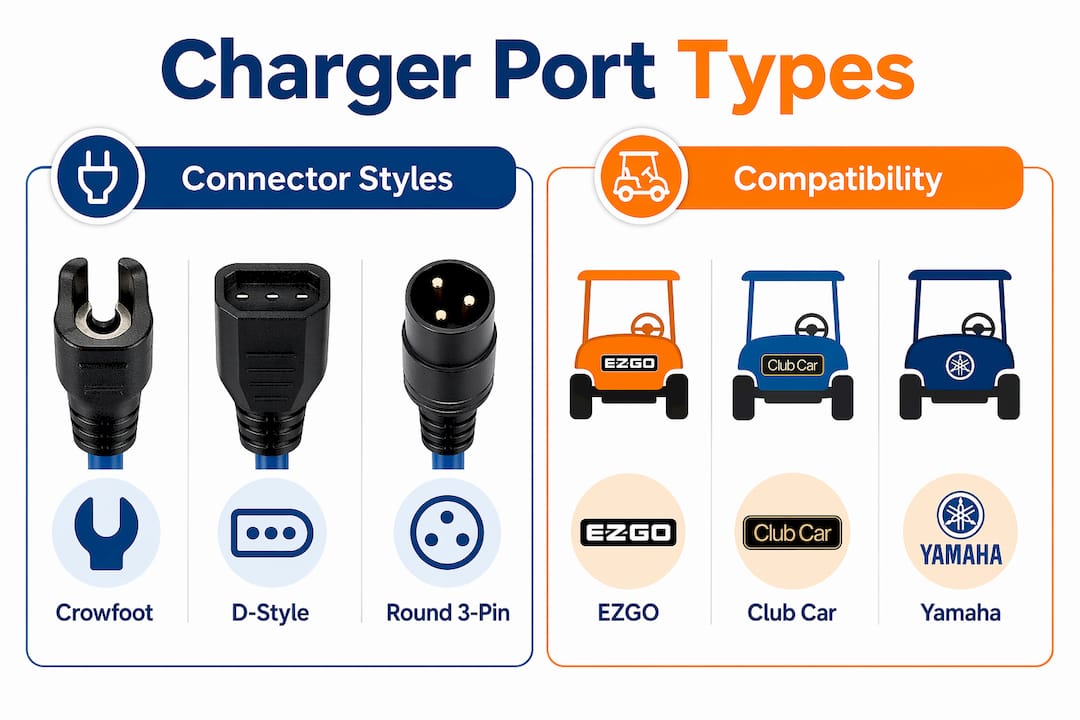
Here is how the five types break down by brand, voltage, and typical application:
| Port type | Compatible brand | Voltage range | Typical models |
|---|---|---|---|
| Crowfoot | EZGO | 36V | EZGO Marathon, older TXT |
| D-Style | Club Car | 48V | Club Car DS, Precedent |
| Round 3-Pin | Yamaha | 36V, 48V | Yamaha G9, G16, G22 |
| Nabson | Club Car, EZGO | 48V, 72V | Club Car IQ, EZGO RXV lithium |
| RXV Triangular | EZGO | 48V, 72V | EZGO RXV, Freedom RXV |
Cart voltage ranges from 36V to 72V depending on the model and whether it runs lead-acid or lithium batteries. Matching voltage to port type is not optional. A 48V charger connected to a 36V system through an incorrect adapter can overcharge and permanently damage the battery pack. The physical shape of the plug is the first line of defense, but voltage confirmation is the second and equally critical check.
Pro Tip: Before ordering any replacement port, photograph your existing receptacle from two angles and note the voltage printed on your charger or battery pack. This two-step confirmation eliminates the most common ordering mistake.
The charge receptacle does more than pass electricity. Modern golf cart charging options rely on a handshake communication protocol between the port, the charger, and the battery management system. During this handshake, the charger reads battery temperature, checks pack voltage, and confirms chemistry type before delivering current. This process protects the battery from overcharge, undercharge, and thermal runaway.
Several EZGO models include a safety interlock wired through the charge receptacle. When the charger connects, the port signals the controller to disable the motor, preventing the cart from driving while plugged in. This is an important safety feature that many owners do not realize exists until they install a non-compatible replacement and find the cart either moves while charging or refuses to charge at all.
Replacing a charge receptacle with a non-compatible part disrupts this communication loop. The charger may refuse to start, deliver incomplete charges, or apply the wrong voltage profile. For lithium battery systems in particular, an interrupted handshake can trigger the battery management system to shut down entirely, leaving the cart stranded. This is why OEM or verified-compatible parts are worth the extra cost over generic substitutes.
The port also includes battery temperature sensing on some models, feeding real-time data to the charger to adjust output. This level of control makes the receptacle a functional component of the charging system, not just a passive connector.
Charger port problems follow a predictable pattern. The symptoms start subtle and escalate quickly if ignored.
Replacement receptacle costs typically run between $90 and $105 for OEM-grade parts. That cost is far lower than replacing a battery pack damaged by chronic undercharging or a charger burned out by persistent resistance at the port. The good news is that replacing the receptacle does not require changing the wiring harness or the battery system. It is a targeted fix that resolves most connection issues on its own.
Inspect your port every 30 to 60 days if you charge frequently. In coastal or high-humidity environments, monthly cleaning with an electrical contact cleaner extends port life significantly.
Selecting the right replacement port requires three confirmed data points: port type, cart voltage, and battery chemistry. Lead-acid and lithium packs use different charging profiles, and some receptacles are wired specifically for one chemistry. Confirming all three before purchasing prevents a second trip to the parts catalog.
Follow these steps when replacing a charge receptacle:
For ongoing charger port maintenance, clean the receptacle pins with electrical contact cleaner every one to two months. Apply a thin layer of dielectric grease to the pins after cleaning to repel moisture. Inspect the port housing for cracks after any impact or if the cart has been stored outdoors through a wet season.
Pro Tip: Never force a charger plug that does not seat easily. Resistance during insertion means the plug and port are mismatched or the port pins are bent. Forcing the connection bends pins further and can crack the port housing, turning a minor fix into a full replacement.
Refer to the charger maintenance steps guide for a full breakdown of inspection intervals and cleaning procedures tailored to each major brand.
A golf cart charge receptacle is a functional electrical component that controls power transfer, polarity, communication, and safety interlocks. Treating it as a passive plug leads to preventable failures.
| Point | Details |
|---|---|
| Port function | Transfers DC current, maintains polarity, and enables charger-to-battery communication. |
| Five port types | Crowfoot, D-Style, Round 3-Pin, Nabson, and RXV Triangular cover 90% of golf carts. |
| Voltage matching | Confirm cart voltage and battery chemistry before selecting any replacement receptacle. |
| Damage warning signs | Melted pins, heat at the port, and ghost charging all require immediate inspection or replacement. |
| Maintenance frequency | Clean and inspect the receptacle every 30 to 60 days to prevent corrosion and resistance buildup. |
I have seen the same mistake repeated hundreds of times. An owner buys a new charger because the old one “stopped working,” installs it, and has the same problem within a week. The charger was never the issue. The port was corroded, the pins were worn, and the new charger was fighting the same bad connection the old one gave up on.
The second most common mistake is assuming plug shape is the only compatibility factor. Owners match the physical connector, ignore the voltage rating, and end up with a charger that fits but overcharges or undercharges the pack. Battery chemistry adds another layer. A lithium pack paired with a lead-acid charge profile will degrade faster than a pack that never gets fully charged.
What I find most overlooked is the safety interlock. On EZGO RXV models in particular, the charge receptacle is wired into the motor controller. A generic replacement that skips this pin disables the interlock, and suddenly the cart can move while plugged in. That is not a minor inconvenience. It is a genuine hazard.
My honest advice: inspect the port before you blame the charger or the batteries. Clean the pins, check for heat damage, and confirm the voltage rating on the receptacle matches the pack. In my experience, a $95 receptacle replacement resolves what owners assume is a $400 charger problem or a $600 battery problem more often than anyone wants to admit. Consult a qualified golf cart technician for any replacement involving lithium systems or integrated motor controller wiring.
— Roshan

Golfcartstuff carries OEM and aftermarket charge receptacles for EZGO, Club Car, and Yamaha models across the full voltage range from 36V to 72V. Whether you need a D-Style port for a Club Car DS or a Round 3-Pin receptacle for a Yamaha G-series cart, the catalog is organized by brand and model to make part matching straightforward. Every listing includes voltage rating and compatibility notes so you order with confidence. If you are unsure which receptacle fits your cart, the Golfcartstuff team can help you confirm the correct part before you buy.
A golf cart charger port is the female socket that connects the battery charger to the cart’s battery pack. It transfers DC current, maintains polarity, and enables communication between the charger and the battery management system.
The golf cart charging port location varies by brand. EZGO carts typically place it on the driver-side front panel, Club Car models mount it under the seat or on the rear body, and Yamaha G-series carts locate it near the battery compartment.
Identify your port type by checking your owner’s manual or matching your cart model to the five main types: Crowfoot for older EZGO, D-Style for Club Car, Round 3-Pin for Yamaha, Nabson for newer Club Car and EZGO lithium models, and RXV Triangular for EZGO RXV carts.
Yes. Replacing the charge receptacle is a standalone repair that does not require changing the wiring harness or battery pack. Symptoms like needing to wiggle the charger handle or visible pin damage confirm the port is the problem.
Inspect and clean the charge receptacle every 30 to 60 days under normal use. In humid or coastal environments, monthly cleaning with electrical contact cleaner and a light application of dielectric grease prevents the pin oxidation that causes ghost charging and connection failures.
Explore our store to see what our products and resources can do for you.

Leave a comment